Deciding to start a blog comes with a lot of decisions to make. One such decision: What’s the best blogging platform should I use?
While there are numerous blogging platforms available, below we take a look at some of the most common platforms to help you make the best decision.
| Blogging Platform | Cost | Key Benefits |
|---|---|---|
| WordPress | Free (with Hostgator hosting) | 1. Flexible customization options with thousands of plugins and themes. 2. Great SEO capabilities. 3. Active community and support. |
| Wix | Free (with paid upgrades) | 1. Easy to use drag-and-drop editor. 2. Professional templates. 3. Built-in SEO tools. |
| Squarespace | Paid plans start at $12/month | 1. High-quality, modern templates. 2. Easy-to-use platform with drag-and-drop editing. 3. Excellent customer support. |
| Medium | Free (with paid subscription options) | 1. Large built-in audience. 2. Simple and straightforward interface. 3. Easy to find and connect with other writers. |
| Ghost | Paid plans start at $29/month | 1. Focuses solely on blogging, with a clean and simple interface. 2. Great for SEO. 3. Built-in email newsletters. |
| Tumblr | Free | 1. Built-in social features make it easy to connect with other bloggers. 2. Easy to use, with simple customization options. 3. Good for visual content. |
| Weebly | Free (with paid upgrades) | 1. Drag-and-drop editor with many customization options. 2. Good for ecommerce sites. 3. Mobile-responsive design. |
So What is the Best Blogging Platform?

WordPress.org
Price: Free software; Approximately $3 per month for hosting. For a step by step guide, check my how to start blogging guide.
A self-hosted WordPress blog is one that uses the WordPress software on a third-party server. With it, you can install plugins, edit your HTML code, and more, giving you full control over your website while making it look more professional. A self-hosted WordPress blog is usually the best way to go for anyone willing to invest a couple of dollars per month. It’s ideal for business owners, professional brand builders, and any blogger looking to expand their site’s functionality and professional appearance.
Pros:
- User-friendly with full control and customization options.
- Access to over 1,500 free themes and 20,000 free plugins.
- Search engine friendly options.
Cons:
- Hosting on a third-party server can require some technical knowledge, but most hosts (like Bluehost or Hostgator) offer quality technical support.
- Due to its popularity, WordPress is vulnerable to security threats.
Start your Blog with Hostgator today and get a 60% discount
WordPress.com
Price: Free
WordPress.com stores your site’s content for free on their servers. However, this means users receive a limited version of the WordPress software. Still, it’s a nice choice for hobby bloggers who don’t want to invest money. It’s also a good option for people who plan to upgrade to a self-hosted WordPress blog in the future.
Pros:
- No set-up costs.
- Simple to use; no coding or design knowledge required.
- Hundreds of themes to choose from.
Cons:
- Functionality is limited unless you pay for upgrades.
- It looks less professional.
- You do not technically own your blog, which means you have little control over advertising revenue. It also means WordPress can suspend your site at any time.
- Your site comes with .wordpress in the domain.
Blogger
Price: Free
Since Blogger is owned by Google, you’ll have access to Google tools like AdSense, Analytics, etc. However, Blogger is not nearly as flexible as WordPress.org. This platform is great for hobby bloggers and brand builders who don’t want to invest any money but may want to make some money through ads. Since it is easy to use, it is also a great platform for beginner bloggers just learning the ropes.
Pros:
- Completely free and easy to use.
- Can place AdSense ads.
- Access to HTML code, so there are more customization options.
Cons:
- Fewer themes and storage space than WordPress.com.
- You cannot self-host, so your blog is dependent completely on Blogger’s current offerings.
- Your site will have .blogspot in the title.
Tumblr
Price: Free
Tumblr is easy to use and is a very social platform. This is the perfect place for bloggers who like the idea of “reblogging” posts. Its platform is best for microbloggers, so it’s perhaps not the best place to start if you are looking to develop long-form content.
Pros:
- Unlimited storage.
- Approximately 1,000 themes to choose from.
- HTML and CSS access for customization.
Cons:
- Backing up your blog and importing your content from other platforms is difficult.
- There are very limited plugin options.
- It is tough to monetize.
TypePad
Price: $8.95+/month
TypePad is a good platform for business professionals or brand builders who don’t mind investing some money every month into their blog. That price can pay in delivering more features and a more professional-looking site. However, most people will still tell business bloggers to choose a self-hosted WordPress platform due to its large community, but TypePad does have its advantages.
Pros:
- They host on their servers, but you own your blog.
- Unlimited storage space.
- Easy to use.
Cons:
- It costs a few dollars more per month than a self-hosted WordPress site.
- Customization options can be limited.
WIX
Price: $4.08+/month
WIX is a good website option with blogging capabilities that is ideal for businesses. With its ecommerce functions, WIX makes building your entire ecommerce business website simple, although full control over your online shop is somewhat limited.
Pros:
- Unlimited bandwidth.
- Ad integration.
- Easy to use.
- Domain registration options.
- Up to 20 GB storage.
- Hundreds of professional-looking templates.
Cons:
- More expensive than a self-hosted WordPress blog.
- Ecommerce tools aren’t very advanced.
- Limited customization options.
Any of the free options are ideal for novice or hobby bloggers who don’t want to invest any money while the paid options are better for business blogs. Choosing the right one comes down to how you want your site to function. Which platform do you think you’ll choose?
Quick reference
Mike Wallagher of Start Blogging Online put together a nice comparison of blogging platforms you can reference as you choose a blogging platform.
Be sure to click on the image to see a larger version.
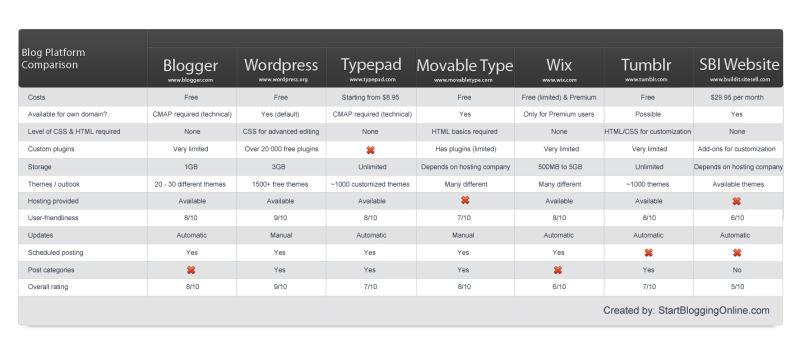
Blog Comparison Chart – Start Blogging Online
I was using blogger plateform earlier but switched to WordPress. I think this was good decision at right time. WordPress is better than others.
WP is by far the best option. I haven’t tried ghost yet but I heard that it may be a fad that will fall off.
Awesome post. Gonna get started on my blogging fever !
Pingback: Works-Cited Page | Online Writing Blog
Which is the best blogging platform? Please do reply
I always choose WordPress because it gives me better control over my blog and i recommend It to everyone.
I have used WordPress and Blogger both. What i have found is WordPress is having more options than Blogger. You will not get Wonderful Plugins for blogger. But for WordPress you will get a lot and those are just fantastic. Not only this, for the beginners, WordPress is just awesome.
I chose WordPress since a couple of my programmer friends separately recommended it to me. WP is so easy to use, and it has a vibrant community of people writing about everything imaginable. I would like to eventually learn more about the differences between self-hosted wordpress.org and the more basic wordpress.com.
Selecting a blogging platform is one of the hardest task in blogging.According to me a newbie blogger should either choose a blogger platform or word press platform.If you are looking for earning something without loosing much money then you should go after blogger.But still i would say word press is the best blogging platform because it is very much seo friendly compared to other platforms. The main problem with word press platform is that it requires some initial payment. You had spotted some interesting quotes on blogging platform thanks howdy for sharing this valuable knowledge with us.
i think wordpress is the simplest and common used blogging platform these days. it has a lot of plugins and features to help you manage your blog.
Pingback: Tips og 88 nyttige lenker for nye og etablerte matbloggere « matosofi
I chose WordPress because I saw a lot of videos with professional bloggers who say that WordPress can be the greatest thing when you want to have your own site or blog, because it allows you to do many everything that you can obtain with the help of a coder, but this time is for free and is easy to implement by beginners. There are hundreds of thousands of plugins that can give you unlimited possibilities for customization.
For Me Blogger is the best platform. Full of features and Fully Free!
WordPress is very easy to maintain and configure whereas Blogger has very limited options for Non Geeky persons. WordPress can be easily managed by a person and if required can troubleshoot minor errors and glitches. But for a blogger the troubleshooting requires specific knowledge and techy gyaan. So I will stick and refer WordPress as of now.
For me its wordpress followed by joomla. WordPress has grown from a baby to a professional now. It certainly has the biggest plugin market and is most customizable and easy to develop. By the way thank you for this wonderful article.
WordPress is indeed the top rated blogging platform for all the bloggers and webmasters….
WordPress is absolutely the best for beginners. Blogspot is good too still for self hosted platform, i prefer WP.
Robin.
I would say always go for WordPress, as it is simple to use and has lots of plugins!!!
WordPress is undoubtedly the best blogging platform..
Thanks for sharing the list..
i think wp is good for a beginner after you learned the basics, you are in the right path to learn the good stuff
Thanks for this great post. Blogging is a very intricate world for beginners. We can often read about all the mistakes we should not do but actually choosing the platform is often the first one!
I don’t agree with you. Blogger has a lot of better and easy to use features than WordPress. The layout designing is much easier in Blogger and Adsense implementation is a piece of cake – contrary to WordPress which is harder to use.
i like this post very nice article, most of people moving towards word press blog platform , thanks for sharing this valuable information.
great post and valuable , i like this post, i thought that word press is very good option for blog, very nice article, thanks for sharing.
This is a great comparison!
Thanks for taking time and sharing it.
I agree with Lisa that WordPress is the most wonderful and the best platform to create websites and blogs easily….
Easy to customize and easy to use….:)
I guess WordPress is still the #1 because of the plugins and easy customization. But i just hate to update to the latest version. It’s annoying! And sometimes, your old themes or plugins are not compatible to the latest version.
Trust me, I’ve tried many blog/cms scripts out there. Nothing beats WP for blogging purposes.
We’re lucky there are TOO many plugins that get updates, that means the community is vibrant, people keep updating their FREE scripts for all of us.
Comments are closed.