Traffic

How can I encourage more people to subscribe to my blog?

Today's post is brought to you by the ever-popular and knowledgeable Jordan from Momma Blogga. She has graciously agreed to guest post for me all week while I bask in the glory that is a family reunion. Welcome Jordan (as you always do) and leave her many comments so she's come back!

Blog subscribers are one metric that bloggers often use to promote their blog, encourage advertisers and mark their progress.

Probably the most important thing you can do to encourage your readers to subscribe is to write good content.  (That's always the first tip in blogging!)  After that, though, you have to let your readers know what to do—encourage them to subscribe and make it easy on them.

One important way to do this is to add a standard RSS button to your blog.  People familiar with blogging will recognize the universal RSS symbol.

Also important with that button is to include text with it to explain it to people not as familiar with the RSS icon.  A good idea is to use a phrase like "Get updates to a feed reader" (or email) to help people who aren't familiar with the terminology of the blogosphere.  You should make this text, like the button it will accompany, a link to your feed.

Offering e-mail subscriptions opens up your blog to more subscribers than just people who use feed readers.  Once again, changing the default text in the widget to read something like "Get updates from this blog in e-mail" can help more people understand the function of this feature.

If you have a good number of subscribers (at least a few dozen, though professional blogs might want to wait until they reach at least 100) already and you're using FeedBurner or FeedBlitz, adding a feed count chicklet can encourage more people to subscribe.  This is called "social proof"—it sends the message that "all these people have found this information valuable, so you might, too."

Finally, if you're able to edit your blog template (as in Blogger, for example), you can add a line of text that will show up at the bottom of all your posts.  This has been called the "magic sentence," and usually takes the form of "If you enjoyed this post, you can get updates from this blog" or "subscribe to this blog."  This sentence should include a link to your RSS and/or e-mail feed.

I see lots of blogs that show the number of subscribers they have. How can I do this?

Today's post is brought to you by the ever-popular and knowledgeable Jordan from Momma Blogga. She has graciously agreed to guest post for me all week while I bask in the glory that is a family reunion. Welcome Jordan (as you always do) and leave her many comments so she's come back!

The easiest way to find out how many subscribers you have and is to use a service like FeedBurner.  FeedBurner provides some nice bells and whistles for blogs' RSS feed syndication, including subscriber numbers.  You can show off your subscriber numbers with FeedBurner-made chicklets, which you can customize to match the colors of your blog.

To create your custom chicklet, log in to FeedBurner and go to Publicize>FeedCount.  Here you choose your options:

  • Animated/static: the animated option tends to draw people's eyes more, but only if it's visible when the graphic loads.  (If your readers will have to page down to see it, they'll miss the animation).
  • Color scheme: here you can set the colors of the text and the background of the chicklet to match the colors of your blog.  You can use the rainbow chip or pull the color numbers directly from your blog's CSS and enter them in the boxes to the right of the rainbow chip.

Click Activate.  The page will change, showing your chicklet and the HTML code you'll need to insert the chicklet in your blog.  FeedBurner also has options to click through to TypePad or Blogger blogs to directly add your widget.  In WordPress.com, you'll have to go to Design > Widgets.  Add a new Text widget.  Click Edit by the new Text widget and paste the HTML code for your chicklet into the widget.

If you use FeedBlitz for e-mail subscriptions, FeedBlitz also provides an e-mail subscriber count chicklet.  Again, FeedBlitz provides TypePad and Blogger widgets, but you'll have to get the HTML code and paste it as above for WordPress.com blogs.

How can I make a comment on a blog into traffic for my site?

You can't make a comment on one blog into traffic for your site.

However, you can become an interested part of a community and contribute to conversations in the comments sections of several blogs (also part of that community--whether it's political, parenting, gardening, etc.). The more you comment, the more visible you are. The more interesting your comments--and the more relevant they are to the topic--the more visible you are.

Other readers will begin to notice your comments at the blogs you both frequent. Soon, if your comments are relevant, respectful, and interesting, those other readers may want to click over to your site to see what else you have to say. Providing your blog is also relevant, respectful, and interesting they will stick around, maybe add you to their blog rolls, and maybe link to you in a post.

Everyone loves traffic. For bloggers, it's almost always about the comments and the traffic. We like to know that what we are doing is worthwhile and maybe even helping someone. Knowing that people are visiting our blogs and bothering to leave a comment is reinforcement that our blogs have a voice that is being heard.

Having said that, bloggers must have patience. Very few bloggers start their blogs and immediately have more than 20 people visiting and commenting on a regular basis. Building a community and becoming part of a community takes time. Sometimes it takes a long time.

Keep at it, though. Comment often and comment well. Don't poach traffic (by leaving your URL or an irrelevant link in the comment), but do entice others to want to visit your site. That means not just commenting with "Great post!" or "Wow. I can so relate." Go the extra mile and tell the blogger and readers why you think it's a great post or why it's so relatable.

When you invest your time in a community, you'll most likely be rewarded with traffic from that same community. You have to give to get.

What do you consider a "good volume" of traffic before considering placing ads on your site? 50's, hundred's, thousand's?

As far as I know, no "magic number" exists.  Obviously, the more traffic you have, the more interesting your site is to potential advertisers.  But, to quote the FAQ section at BlogAds:

Blogs without a laser-sharp focus on one topic or community AND an audience of 1000 readers a day usually do not attract advertisers. But some blogs with a sharp focus AND an audience of thousands a day still do not get advertisers. One test: have more than a handful of companies expressed an interest in advertising on your blog?
I know, clear as mud, isn't it?
My advice would be to get your feet wet using a simple ad service like Google AdSense or Amazon Associates.  Concentrate on writing well and growing a consistent readership.  If you get the opportunity to apply for membership in a network like BlogAds or something similar, go for it.  All they can say is "no", right? 

A Video Explaining RSS Feeds in Plain Ol' English

Here is an excellent video from Creative Techs explaining what an RSS feed is and how it works and why you need to make sure yours are working. (Thanks to Jules for the link.)

I use Site Meter's free service on my blog. What are those 0-second visits that Site Meter records?

Site Meter's Knowledge Base answers this in more detail. The gist is that the visitor came to your site and only viewed one page.

The Biggest Technorati Tip in the World

The following article is re-printed with permission from scribbit by Michelle.

A couple months ago I listed Ten Technorati Tips as an introduction to how the service can help increase your blog's exposure. However, since I posted I discovered the most important thing there is to know about Technorati. Pardon me if this is something you already know, but it's buried in Technorati's pages for all but the most dedicated of bloggers to find, I wish I had found it earlier:

Technorati only keeps your links for six months.

There it is, simple and plain. Any link your blog gets will only be kept by Technorati for six months exactly. This is because Technorati wants to make sure they're only ranking the most current and popular blogs, not blogs that were popular two years ago. Now, here is where this gets important: what does this mean for your blog?

It means the first six months are critical for developing links. From the day you first register with Technorati the clock starts ticking and for six months you can collect links right and left free of charge but one hundred eighty days after that things change. From that time on your links begin to expire, day by day, and begin to drop off your list.

For example, I signed up for Technorati on September 13, 2006. From that day until March 13, 2007 I collected links one after the next until I accumulated around 1200 but on March 14th all links I acquired on September 13th expired and dropped off my list. On March 15th any link acquired on September 14th dropped off, on March 16th all links for September 15th dropped off and so on.

Luckily for me I discovered this principle around the middle of February and knew it was coming and realized I had another month to gain links because on March 14th any links I gained would be offset by the links that expired. Does this make sense? The first six months are a time of growth, once you're past it and begin losing links you will pass into more of a maintenance mode where it is harder to rise in the rankings.

This doesn't mean you can't still grow after six months it just means it's harder to do. To give you an idea, I wanted to see if I could break into the top 1000 before my six months were up. I hit 989 a week before my March 13th deadline and since then I've continued to increase, but at a much slower rate. Of course people are more prone to link to me now that I've been around awhile, I didn't get many links six months ago, and I collect links much faster now than I used to so the farther I go, so the more time that passes, the more links are going to be expiring. If you've been confused as to why your Technorati ranking may have dropped suddenly on a particular day, it could be because of expiring links.

So if your blog is new, do your best to encourage links and if you've been around a while, do your best to encourage links. No blog can afford to sit back and relax with their collection of links and feel confident in their Technorati ranking because the days for each link are numbered.

Stumbleupon in Five Easy Steps

Michelle from scribbit is back with us today. In fact, she'll be with us most of this week! She has generously agreed to let us re-print several of her articles here on Blogging Basics 101. We know you'll appreciate her input and advice. BTW, if you aren't reading her on a daily basis, you should be. Check her out.

StumbleuponThis one's not just for bloggers . . .

***

If you pay much attention to the blogging world you may have noticed that the most influential and popular blogs are tech blogs--blogs about blogging, computers and the internet. Why is this? The percentage of the population involved in the tech industry isn't representative of the percentage of tech blogs in production, so why do they have such a chunk of the cyber world's attention?

It's from two things: First, those who are interested in tech subjects are the ones building the internet and the blogosphere but second, readers who are interested in tech blogs are also savvy to social bookmarking: tools to mark and rate websites that have the power to drive certain blogs into the blogosphere's attention.

I'm frustrated that with as many smart, capable bloggers as I've come across few are aware of these social bookmarks and the power they represent for driving non-tech blogs into the public notice.

Many bloggers are concerned with little outside their niche and are therefore generally languishing in anonymity. I'm hoping to help change this by explaining and encouraging the use of one social bookmark I've fallen in love with: Stumbleupon.

Whether you're a blogger or a reader, Stumbleupon is a web-discovery tool that operates much like your remote control on your television: with each click you can forward to the next randomly-selected website offered for your approval. Well, it's not entirely random, websites are generated based on various criteria you select when you join the world of Stumbleupon.

Here's how it works:

1. Go to Stumbleupon and click the Sign up Here button to register. It is compatible with both Firefox and Interenet Explorer.

2. Download the Stumbleupon toolbar. It takes just a moment and once you download it you'll have to close and then reopen your web browser to see the toolbar appear at the top of your screen.

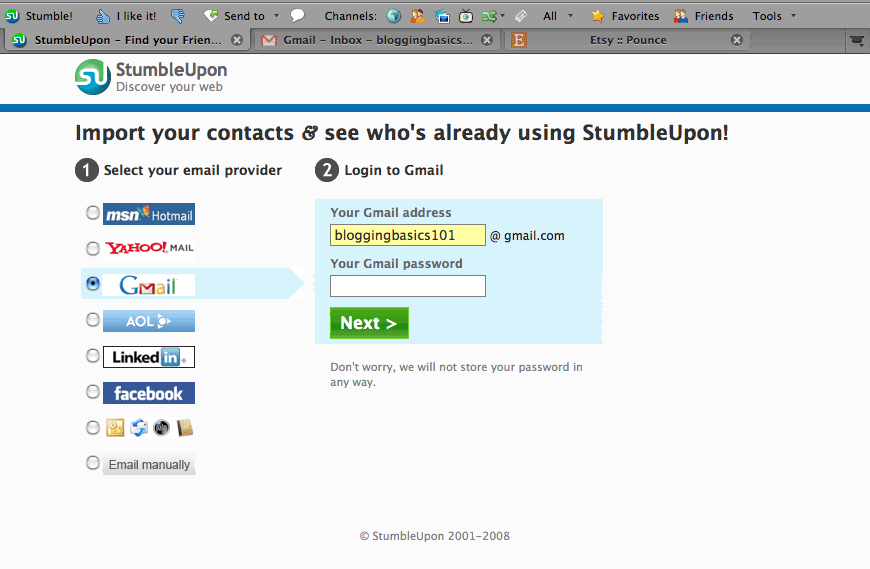
3. Create a profile page. They'll walk you through the details and they'll ask for information such as where you are, if you want a picture included, things like that. If you have a blog you can register the URL with Stumbleupon.

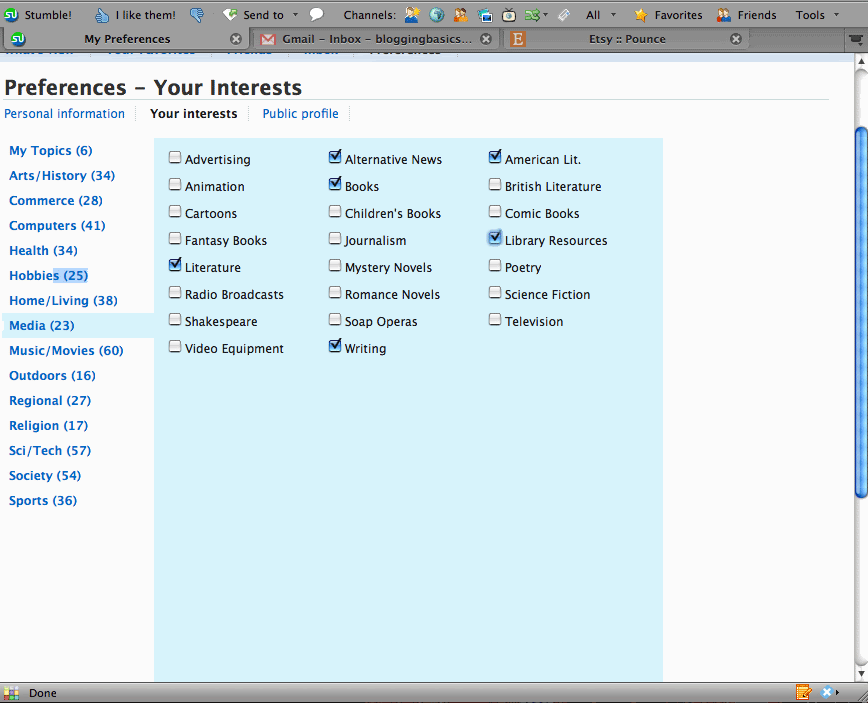
4. Customize your stumbles. Once you've done steps 1-3 you'll be able to visit a page that looks like this where you can select which topics interest you. For example, I've selected things such as gardening, family, humor, home, hobbies and cooking.

5. Click that new Stumble! button you now see at the top of your page and see where it takes you. You'll immediately be whisked away to a site chosen for your perusal based on the topics you've selected. If you especially like it, click the "thumbs up" icon. If you hate it, find it objectionable or are just feeling cantankerous click the "thumbs down." What could be more democratic?

It is the process of each user rating the sites he or she visits that can drive certain posts or sites to the top of the charts. If you are a lucky blogger such as Mom on A Wire, you may have gone to your stat counter one day and discovered piles of mysterious visitors who arrived at your blog via the Stumbleupon train. Once someone Stumblesupon your site and gives you the "thumbs up," it places your site higher in the rankings and more likely to be Stumbled on by the next viewer, and the process grows from there until--if you're my husband--you suddenly have 4000 visitors in a single day (lucky dog).

So go register, get that toolbar, pick the topics you want to read and start Stumbling.

Ten Technorati Tips

Michelle from scribbit is an incredibly blog-savvy gal. She has generously agreed to let us re-print several of her articles here on Blogging Basics 101. We know you'll appreciate her input and advice. BTW, if you aren't reading her on a daily basis, you should be. Check her out.

1. What is Technorati? Technorati is a blog search engine that explores approximately 62.9 million blogs (as of this posting), then sorts and ranks them based on how they link to one another and how popular they are.

2. How does it help my blog? If you are part of Technorati, then people who go there to search for blogs on a particular topic can find your blog, bringing you more traffic.

3. How do I join? It's easy enough, go to this link here, fill out the information and then "claim" your blog. Just follow the steps.

4. What do I do next? Add Technorati tags, also called social bookmarking, to your blog posts. This means manually adding the html to each post and tailoring tags for each post. Go to this page on Technorati and scroll down for various ways to generate the code. Then, once installed, if someone clicks on one of those tags it will take them to Technorati and list, according to most recent activity or "freshness," blogs that use those same tags--another way to draw readers.

5. What kind of tags should I use? Well, that really depends on two things: what you're post is about and what is popular. An example of a "tag cloud," showing popular tag words, can be found on this link here, the larger the word, the more popular it is.

However, just because a tag is popular doesn't mean you should jump on the wagon with the other 8,390,465 blogs that use that tag. For example, "parenting" is a very popular tag, so when you use it you are competing with an enormous number of blogs. "Motherhood" is still popular, but not as well used, so it may be a better option, as it means less competition for you but still a lot of search possibilities.

Here is a page at Technorati that lists its top daily searches. Keep an eye on what's popular and then tag accordingly and wisely. I will often tag with "Alaska" and "motherhood" because they're popular but not too popular. Go to this page on Technorati and type in "Alaska" in the search box and see how it works.

When you're ready to post, first go to Technorati and do a search using possible tag words and see which might work better, just make sure that whatever tags you use do apply to your content. There's nothing more annoying for a reader than to waste time searching for something that's not there.

Finally, be careful. As my friend Lori at Fun Play Dates found out, tagging a post with "fun playdates" may bring up video blogs you don't want to be associated with.

6. How does Technorati know when I've updated my blog? If you use blog services like Blogger, Moveable Type, Typepad or Wordpress then you are set up automatically. Your blog "pings," or notifies Technorati every time you publish if you allow it to do so. In Blogger this is done by going to your "Settings" page and selecting "yes" under "notify weblogs."

If you aren't using one of these services you may have to ping Technorati manually every time you post, which is also easy to do. If you have questions go to this page on Technorati and it will walk you through the process.

7. What are Technorati favorites? Once you have an account with Technorati you can pick blogs to be added to your personal favorites list. There are two ways Technorati ranks blogs, first by the number of incoming links and second by how many times the blogs are "favorited." Here's the list of 100 Most Favorited Blogs.

If you want to facilitate your readers marking your blog as one of their favorites go to this page on Technorati for the code to paste in your template, making a button on your blog for your readers to click if they want to "fave" you.

If you want to see if you're listed as a favorite you can go to your blog's main info page on Technorati, once you've joined, and near the top of your info page are two tabs, one marked "Favorited By." Clicking on that tab will show you who has favorited you. As an example you can see who has favorited me by clicking here.

8. How can I find out my Technorati ranking? Go to the Technorati home page and type your URL in the search field and click "search." Technorati will give you a ranking compared to 62.9 million of your closest blogging friends. You will see how many blogs link to you and the number of links they give. Give it a try before going on to questions nine and ten which constitute the Big Secret.

9. Why does this matter? Well, I'm not sure it does, my blog doesn't get as much traffic from Technorati as it does from Google, but the theory is the higher your ranking, the greater your visibility, and if you're trying to build your blog, every little bit can help.

10. How can I improve my Technorati ranking? I get this question the most and I love answering it because it's so simple. Remember I said your ranking is based on linkage? Technorati records every link to and from its blogs and updates the number regularly. The more blogs linking to your blog, the higher your ranking.

This means you need to join blogrolls such as Christian Bloggers, Blogging Chicks, Crazy Hip Blog Mamas, etc. whatever fits your blog and niche. You need to be commenting on other blogs because every time you do your name becomes a link back to your URL. You need to be spending as much time as possible leaving your little bloggy footprints in the blogosphere for Technorati to find.

But it also means you need to have great content, writing posts that are worthy of being linked to, and focusing on providing information that others will want to connect to.

Be patient, it does take time. When I started blogging seriously and looked at my ranking I was around 100,000 but three months later I'm at 2,500. Remember the higher you go the slower the progress because competition gets stiffer and other bloggers are collecting links right along with you.

Now, don't forget to head over to scribbit for some great content. Tell her BB101 sent you and you appreciate her expertise!

How do I increase traffic to my site?

The biggest factor? Most bloggers would agree it's simply writing well--a well-written blog will garner readers more quickly than any "gimmicks". But there are things you can do to improve your exposure in the blogosphere:

  1. Be a faithful blog reader--leave comments and link back to your site!
  2. Sign up for several web rings.
  3. Participate in carnivals.
  4. Host a carnival. Many people have boosted their traffic simply by coming up with a great carnival idea. BooMama hosted the Tour of Homes and the Christmas Tour of Homes--both wildly successful. Shannon hosts Works-For-Me Wednesday every week and it's huge. The key is to find something that is universally appealing and then get the word out.

In addition, Scribbit wrote a fantastic article on using Technorati effectively (which in turn may increase your traffic). Linked by permission.


  • BlogHer Ad Network
    More from BlogHer
    Advertise here
    BlogHer Privacy Policy

Design By:

  • Everydaybutton2